Skip to content

Sending invoices to multiple email addresses

Number of views: 6446 1 min read

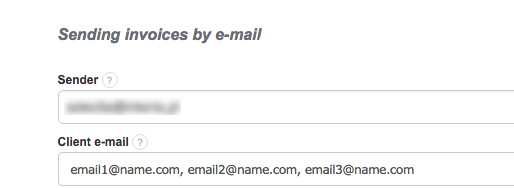
InvoiceOcean enables its users to send invoices to multiple addresses. If you are requested to send an invoice to for instance the accounting department and the client themselves you can easily do so by entering their email addresses separated by a comma. For instance; email1@name.com, email2@name.com, email3@name.com This can be done after clicking send on the invoice.

Was this entry helpful?

Share

Main response Kacper 2020-06-12 09:53

Hello,
you are contacting the wrong company, InvoiceOcean is a software for issuing your own invoices, you cannot make a bank transfer using our system.
I would also suggest to not post bank account details on online forums. You can delete the comment after logging in.

Best regards,
Kacper Seta

Comments (2)

Kacper 2020-06-12 09:53 Main response

Hello,
you are contacting the wrong company, InvoiceOcean is a software for issuing your own invoices, you cannot make a bank transfer using our system.
I would also suggest to not post bank account details on online forums. You can delete the comment after logging in.

Best regards,
Kacper Seta

Anonymous 2020-06-10 18:58

I want transfer 50,000.00 usd to account 0071001252603 for Vietcombank Vietnam