In order to start using promotional codes go to Payments> Promotional codes > Add new promocode.
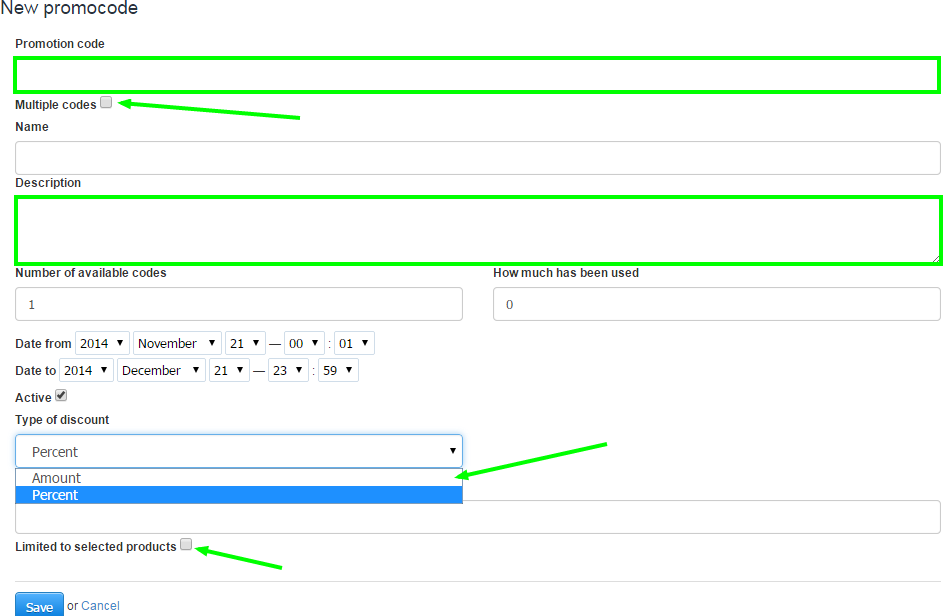
- Promotional code - here you can type the promotional code that will be used by your clients.
- Name - this field lets you name your promotional code.
- Description - here you can describe your promocode.
- Number of available codes - defines the amount of codes that can be used.
- How much has been used - this field is useful if, for example, you have previously used the same code and some of them have been used.
- Date from / date to - lets you set a specific time range in which a code can be used.
- Active - lets you activate and deactivate the code.
- Type of discount - you may choose whether you wish your codes to have Percentage or an Amount discount.
- Discount percent - lets you set the discount percentage.
- Limited to selected products - if you only want your codes to be used on selected products, you may choose them here.