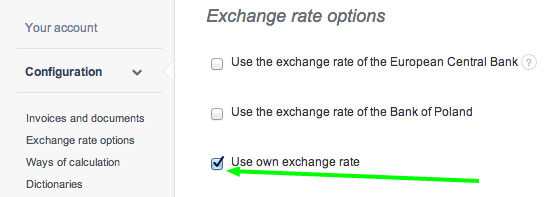
To enter own exchange rate, go to Settings > Account settings > Configuration > Exchange rate options > Use own exchange rate.
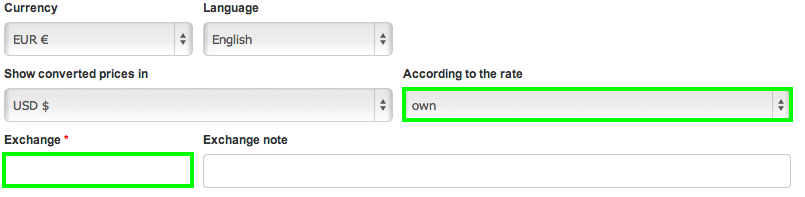
The exchange rate can be defined while issuing an invoice, in the Exchange field.
Unfortunately, I couldn't find an answer to this question.
Unfortunately, I couldn't find an answer to this question.
Hello,
you could have only one conversion, for example EUR to USD.
Words to show amounts for both currencies are available in the ‘gray’ invoice template (https://help.invoiceocean.com/8613725–Total-due-in-a-different-currency-than-the-main-one).
In order to highlight data, both Professinal and Enterprise pricing plans allow you to customise your own kind of a invoice.
Remember that you may also customise your template by using CSS codes.
Kind regards,
Michał
Would like to know how to do a setting in our account for both Invoices & BO’s to show both USD and AED conversion rates. Please refer to the attached Invoice for ref of what we want. Need both currencies to show and also the in words to show for both currencies. Need this feature only when we are billing in USD.
Also can we permanently highlight this line on our invoice?
Hello,
you could have only one conversion, for example EUR to USD.
Words to show amounts for both currencies are available in the ‘gray’ invoice template (https://help.invoiceocean.com/8613725–Total-due-in-a-different-currency-than-the-main-one).
In order to highlight data, both Professinal and Enterprise pricing plans allow you to customise your own kind of a invoice.
Remember that you may also customise your template by using CSS codes.
Kind regards,
Michał