InvoiceOcean gives its Users the possibility to issue invoices in many languages.
To issue an invoice:
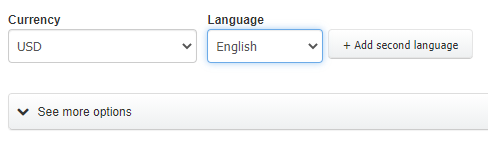
a) in a language other than English - when creating or editing an invoice, using the Language box just above the See more options field, choose one of several dozen foreign language options.
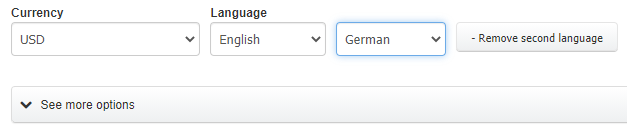
b) in any two languages (bilingual invoice) - when creating or editing an invoice - using the Language box and the Add second language button just above the See more options field, choose two out of several dozen foreign language options.
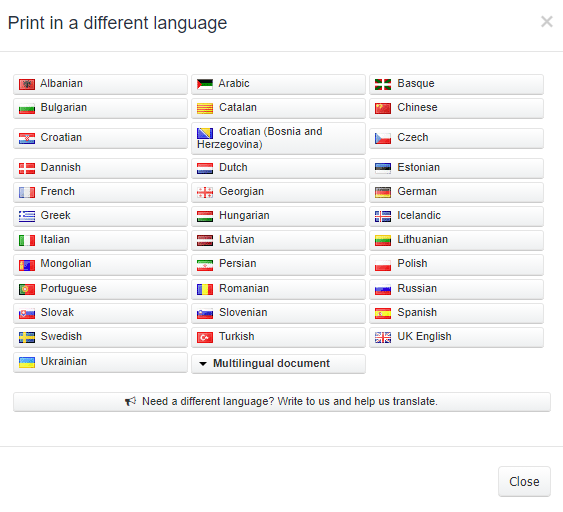
a) invoices may be issued in the following languages:
- Albanian
- Arabic
- Basque
- Bulgarian
- Catalan
- Chinese
- Croatian
- Croatian (Bosnia and Herzegovina)
- Czech
- Dannish
- Dutch
- English
- Estonian
- French
- Georgian
- German
- Greek
- Hungarian
- Icelandic
- Italian
- Latvian
- Lithuanian
- Mongolian
- Persian
- Polish
- Portuguese
- Romanian
- Russian
- Slovak
- Slovenian
- Spanish
- Swedish
- Turkish
- UK English
- Ukrainian
- English-German
- English-Czech
- English-Spanish
- English-Polish
- English-Russian
- English-Swedish
- English-Icelandic
- English-Mongolian
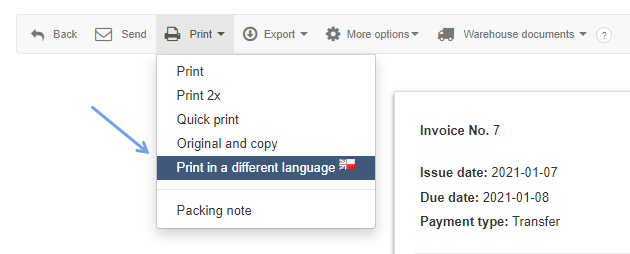
InvoiceOcean also allows you to quickly issue the same invoice in a foreign language from the invoice issued in English.
To do this:
- open a selected document
- go to Print> Print in a different language
- choose one or two languages