Custom roles allow you to independently decide which privileges you want to assign to a specific user. You can create a role that will have access to account settings, similar to the system roles of Account Owner and Administrator, while excluding others that you want to restrict. In this article, we will show you how to create a new role and grant it administrator privileges in the form of access to account settings.
Custom roles - access to account settings
To grant access to account settings within the privileges:
1. Go to Settings > Users and select Roles from the panel on the left side,
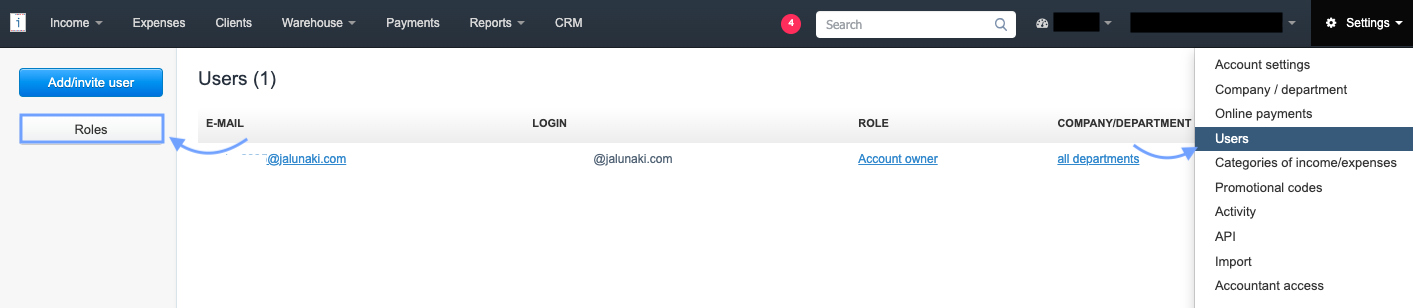

3. Fill in the Role Name field,
4. in the Privileges section, check the checkboxes next to the options that the user should have access to.
5. To grant access to account settings, check the checkbox next to the Account Settings option in the Administrator Privileges section
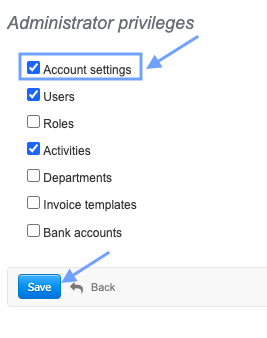
6. Confirm the creation of the new role by clicking Save at the bottom of the page and assign the role to the selected email address.
A person with access to account settings can navigate to the Settings > Account Settings menu and manage the account configuration, as well as other available settings found in the menu on the left side, under the Your Account tab.