InvoiceOcean offers the possibility of using additional applications, such as bank imports, accounting exports, or e-commerce integrations. Access to these options is assigned to system roles such as Account Owner or Administrator. Within the account, you can create your own role and grant users access only to certain options. In this post, you will learn how to grant access to the Apps/Add-ons tab.
Custom roles - access to applications and add-ons
To grant access to the Apps/Add-ons tab within privileges:
1. Go to Settings > Users, and on the left panel, select Roles,
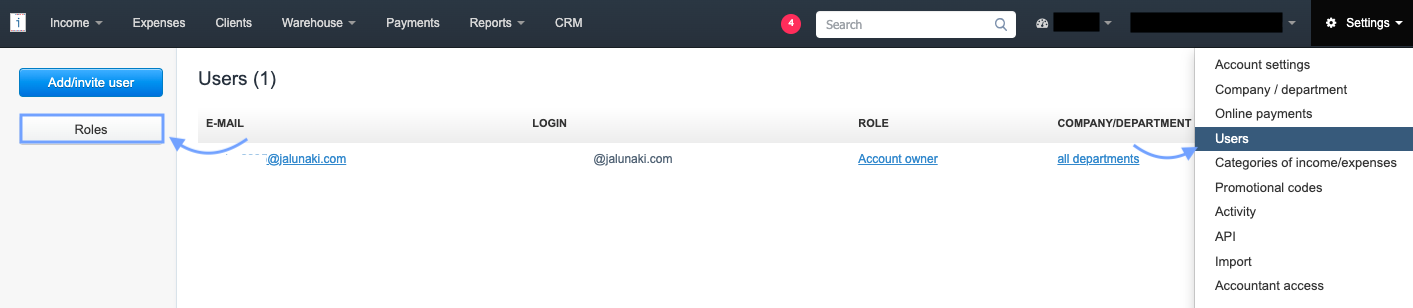
2. In the next step, use the Add new role button,

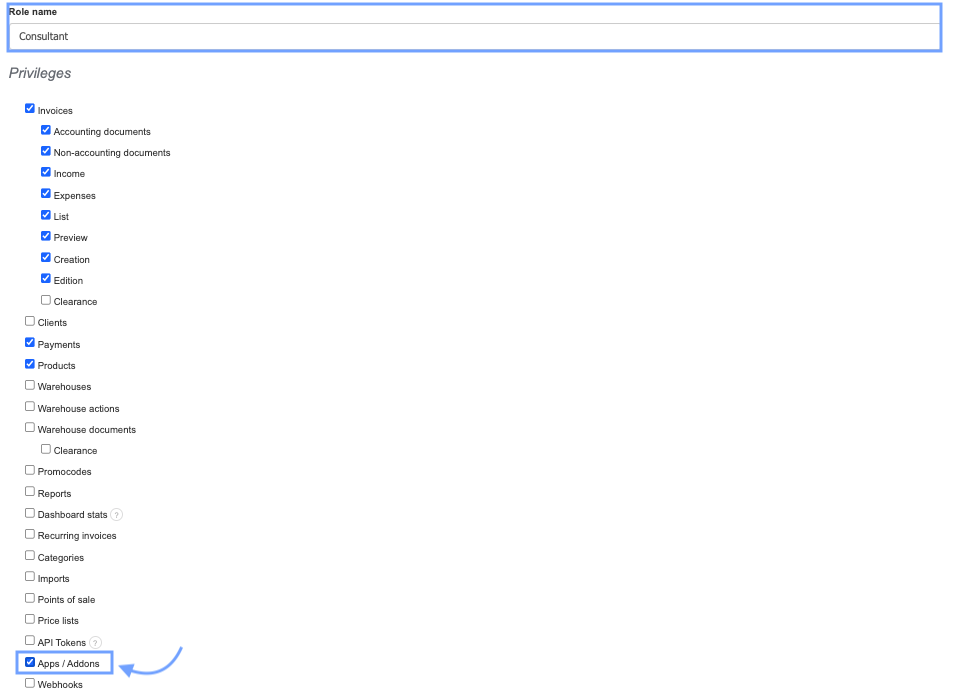
3. Complete the Role name field,
4. in the Privileges section, check the checkboxes next to the options to which the user should have access,
5. to grant access to the "Applications/Add-ons" tab, check the checkbox next to the Apps/Add-ons option.
6. Confirm the creation of the new role by clicking Save at the bottom of the page and assign the role to the selected email address.
A person with access to the "Apps/Add-ons" tab will be able to utilize bank imports and accounting exports. Additionally, within the account, they will be able to activate and configure the functionality of applications provided by InvoiceOcean, such as integration with WooCommerce for online stores.