The system allows to assign custom roles to users. A custom role provides the ability to configure access to selected options according to your preferences. This way, you can decide which data the user can access. In this entry, you will learn how to grant access to warehouses and what scope this privilege entails.
Custom roles - warehouses access
To grant access to warehouses within privileges:
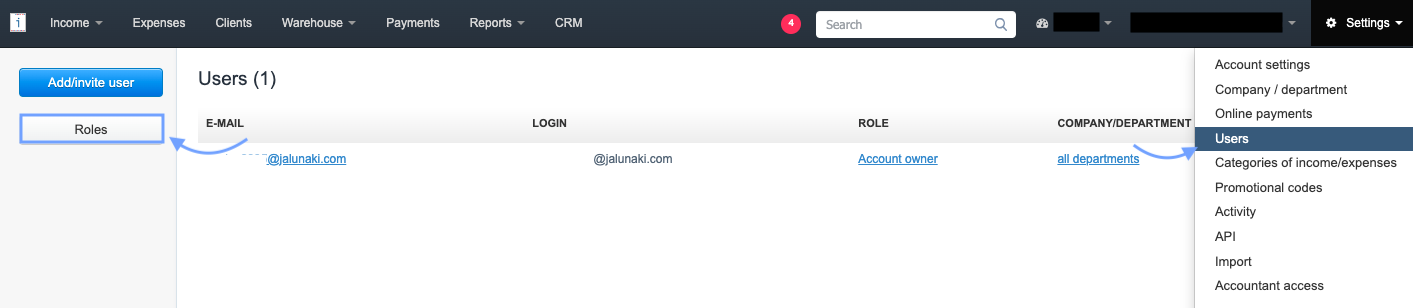
1. Go to Settings > Users, and on the panel on the left-hand side, select Roles,

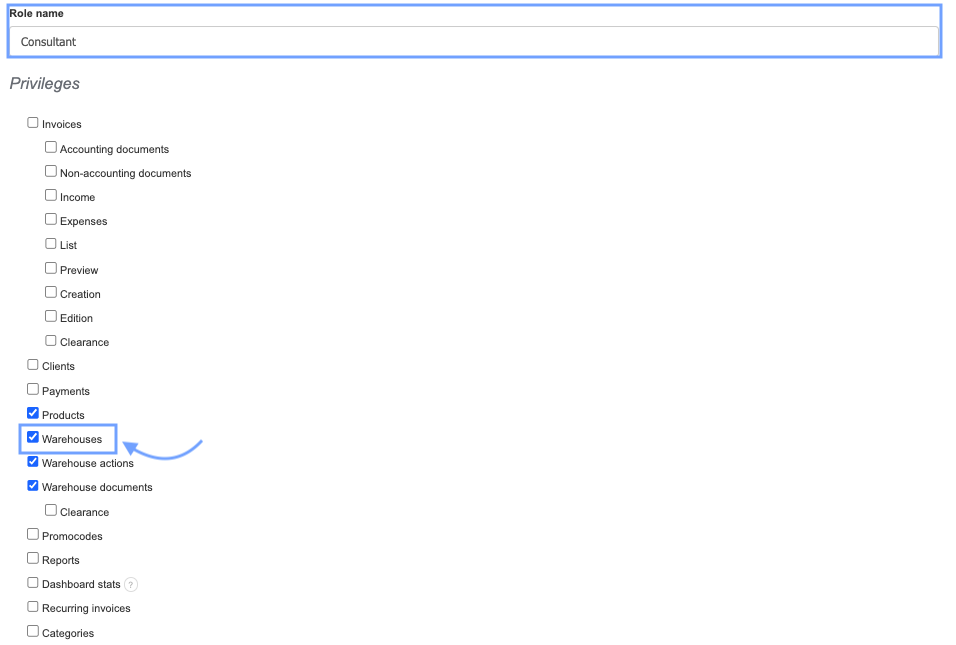
3. Fill in the fields: Role Name.
4. In the Privileges section, check the checkboxes next to the options to which the user should have access.
5. To grant access to warehouses, check the checkbox next to the Warehouses option (to enable the user to edit and create new warehouses, it's necessary to grant access to the Products and Warehouse Documents tabs)
6. Confirm the creation of the new role by clicking Save at the bottom of the page and assign the role to the selected email address.
A user with access to the Warehouses tab will be able to create, edit, and delete warehouses in the system. They will also have the ability to view products if they have been granted access to the Products tab. To enable the user to edit and create new warehouses, it is necessary to grant access to the Products and Warehouse Documents tabs.