Video tutorial:
Depending on the subscription plan in InvoiceOcean, the account owner has the ability to grant access to their account to their employees as well as to an accountant. Invited individuals have their own login and password and can be assigned different system roles, which grants different levels of access to the system's functionalities.
InvoiceOcean users who used the system before 2019 had the option to use only four system roles:
-
Account Owner: This is the person who created the InvoiceOcean account or received these privileges from the person who created the account. The account owner has access to full account configurations in the system.
-
Administrator: This role is assigned by the account owner and allows access to account settings, including adding additional users.
-
User: This role is typically assigned to company employees whose task involves issuing, printing, or sending documents. Users do not have access to account settings in the system. The account owner and administrator can assign access to selected parts of the system to the user or revoke such access. For example, a user can be assigned to only one department of the company. By default, the user has access to every department and can edit and delete invoices issued by other users. However, this can be changed by assigning them to a specific department or by blocking their access to edit or delete invoices in Settings > Account Settings > Configuration > Users and Privileges. Another option is to add them to the system as a user with a custom role and without privileges to edit or delete.
-
Accountant: This role is assigned to an employee of the accounting office, allowing them to have ongoing access to documents issued by the entrepreneur. On each InvoiceOcean account, regardless of the subscription plan, one accountant can be added, and they are not counted towards the limit of users included in the active subscription plan. There is also the possibility of limiting the accountant's role to departments, similar to Users.
Fixed system roles vs. custom roles
A while ago, the system introduced the possibility to create custom roles and assign them to individuals invited to the InvoiceOcean account. Custom system roles are additional roles - alongside those mentioned above - and are entirely defined by the account owner or authorized person. This means that when assigning privileges to an invited person, you can use ready-made system roles or create a custom role as needed.
Note: Custom roles can be defined in any way. The available fixed system roles are immutable and are subject to similar management as before: the scope of the access granted to users and administrators can be specified by going to Settings > Account Settings > Configuration > Users and Privileges.
How to create custom roles in InvoiceOcean:
For each invited person (or group of people) in the system, you can create a role that fits their needs precisely. To create a new role, go to Settings > Users > Roles > Add a new role.
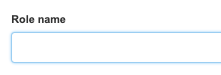
When creating a role, you can start by giving it a name:
Note: Role names in the system cannot be repeated.
Creating a custom role involves checking the appropriate checkboxes, which show individual privileges in the system. The checkboxes that can be checked are divided into two types of privileges: regular privileges and administrator privileges. First, let's look at the list of regular privileges and see what each checkbox means:
Invoices - this checkbox should be checked before granting access to one of the following privileges:
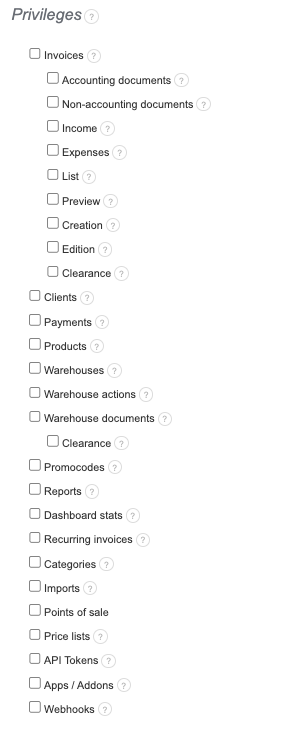
Expenses - a person with access to expenses will be able to navigate to the list of cost documents, view individual documents, and perform activities such as adding, editing, deleting, and other related activities regarding expenses.
List - a person with access to the list of documents will be able to see the list of income documents. However, if the privilege for viewing, adding, editing, and/or deleting documents is not also assigned when creating the role, they will not be able to perform those activities on the listed documents. Access to the list of documents allows searching and filtering of documents, changing the status of invoices, and exporting documents.
Preview - a person with access to preview documents will be able to view income documents. Without additional privileges for adding, editing, or deleting, they will not be able to create, make changes, or delete documents. If such a person does not receive privilege in the document list view, they will only be able to see the document through a direct URL link. The document preview privilege also allows for printing the document.
Creation - a person with access to create documents will be able to add a new income document. If this person is not granted privilege for preview, at the time of saving the document, they will be redirected to the dashboard. Without the privilege to edit and/or delete the document, they will not be able to make changes to the created document or delete it.
Edition - a person with access to edit documents will be able to make changes to the content of income documents. Note: this privilege can be assigned without granting access to the list and preview of documents! This privilege can be used when editing documents through the API; however, we recommend