Thanks to custom roles, you have full control over user privileges, adjusting them to their individual needs and thus ensuring the security of data on your account. One of the functions to which you can grant access is the ability to import data into the system. The system allows, among other things, importing invoices, clients, or products. In this article, we will show you how to create a role with such privilege and what actions a given user will be able to perform after gaining access to the account.
Custom roles - access to imports
To grant access to the ability to import data within privileges:
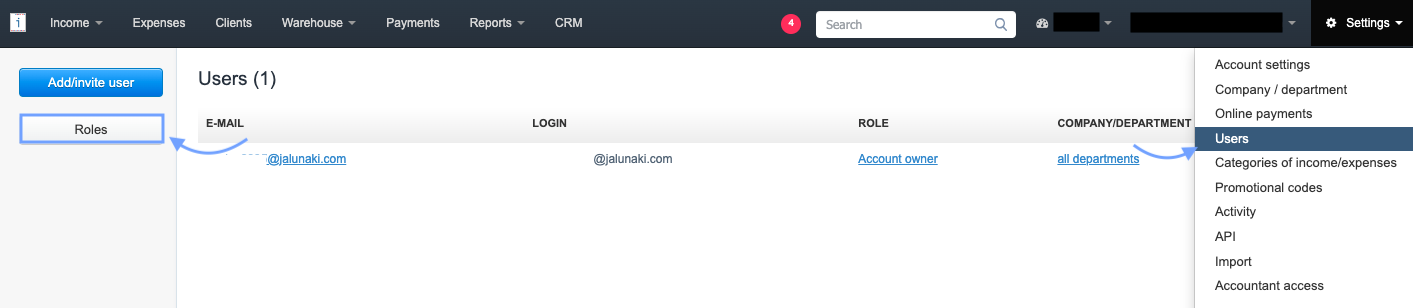
2. In the next step, use the Add new role button,

3. Complete the field Role Name.
4. In the Privileges section, check the checkboxes next to the options that the user should have access to,
5. to grant access to importing data, check the checkbox next to the Imports option.
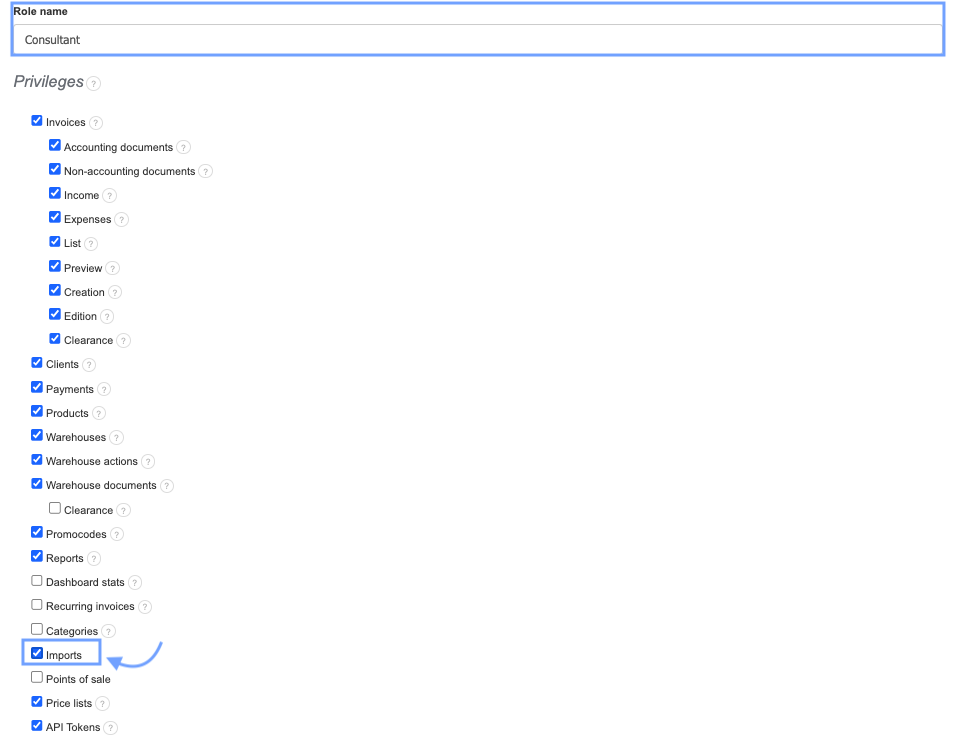
6. Confirm the creation of the new role by clicking Save at the bottom of the page and assign the role to the selected email address.
A person with access to the Imports tab will be able to import customer data, products, invoices, and other data accepted by the system into the account in InvoiceOcean. To allow a user to import bank payments into the account, grant them privileges to access the Applications and Add-ons tab, where specific bank imports are available.