The ability to configure system options allows you to tailor your account to your needs and the profile of your business. You can share access to your account with other users by assigning them predefined system roles. By using the option to create new roles in the system, you gain control over which data the user can access. In this article, we describe how to assign access to the client database and what privileges it includes.
Custom roles - access to clients
To grant access to clients within privileges:
1. Go to the Settings > Users and select Roles from the left panel,
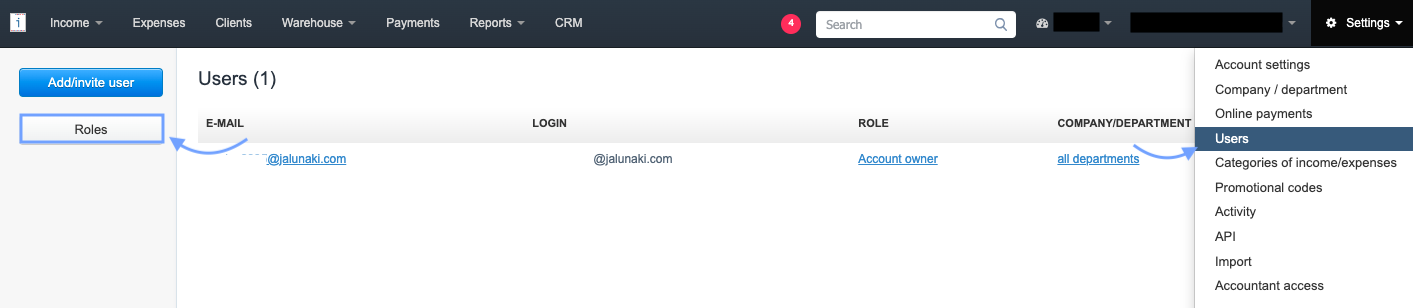
2. In the next step, use the Add new role button,

4. in the Privileges section, check the checkboxes for the options to which the user should have access,
5. to grant access to the client database, check the checkbox next to the Clients option.
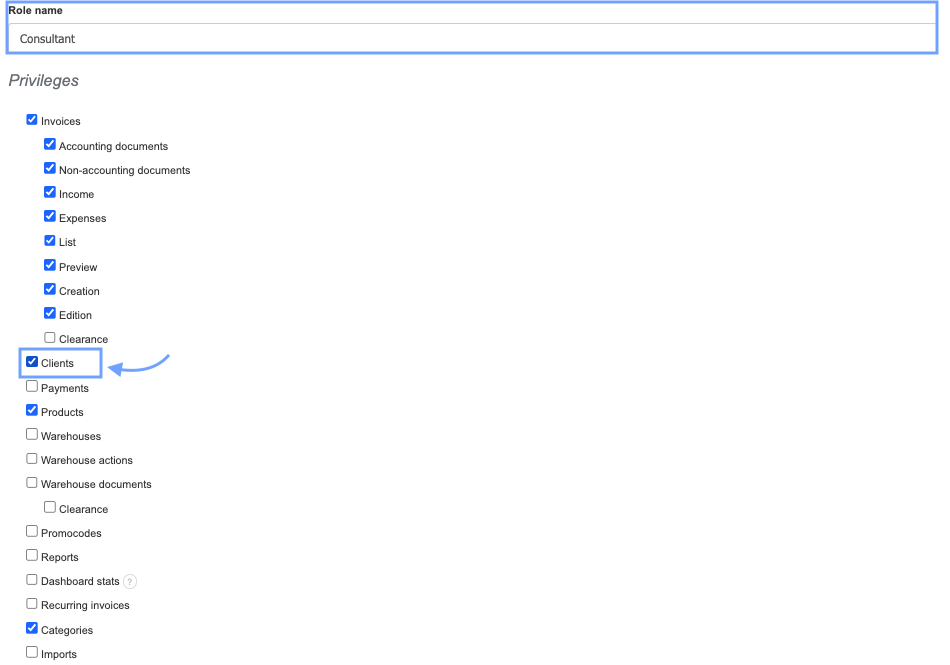
6. Confirm the creation of the new role by clicking Save at the bottom of the page and assign the role to the chosen email address.
A user with access to the Clients tab will be able to view the list of clients, manually create them, edit, and delete them.
Note: A user who does not have the "Clients" privilege will still be able to select a client from the client database when creating an invoice. Data entered for a non-existing client on an invoice by such a user will be saved on the account.