Custom user roles allow for flexible modification of access to various features within the account. A user can gain access to the tab enabling the generation of promotional codes. This enables them to view codes within the account, as well as create, edit, and delete previously generated codes. In this article, you will learn how to create a role with access to the promotional code generation feature.
Custom roles - access to promotional codes
To grant privileges for accessing promotional codes while creating a new role:
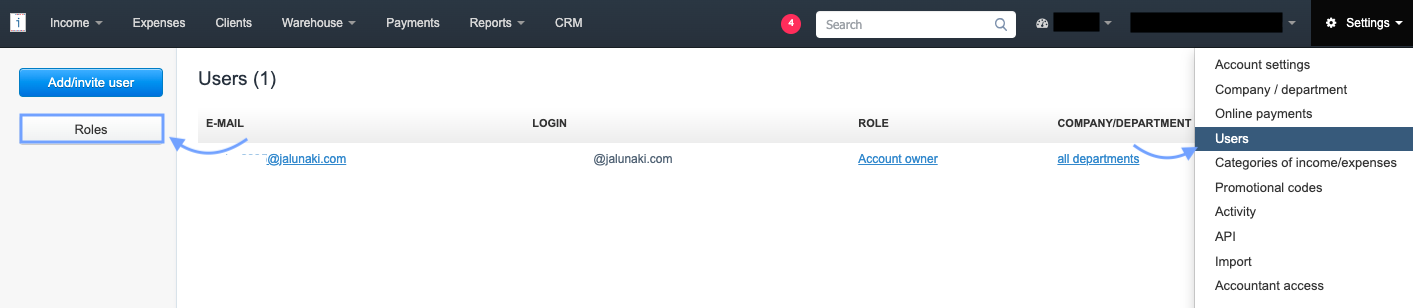
1. Go to Settings > Users tab and select Roles from the left panel,

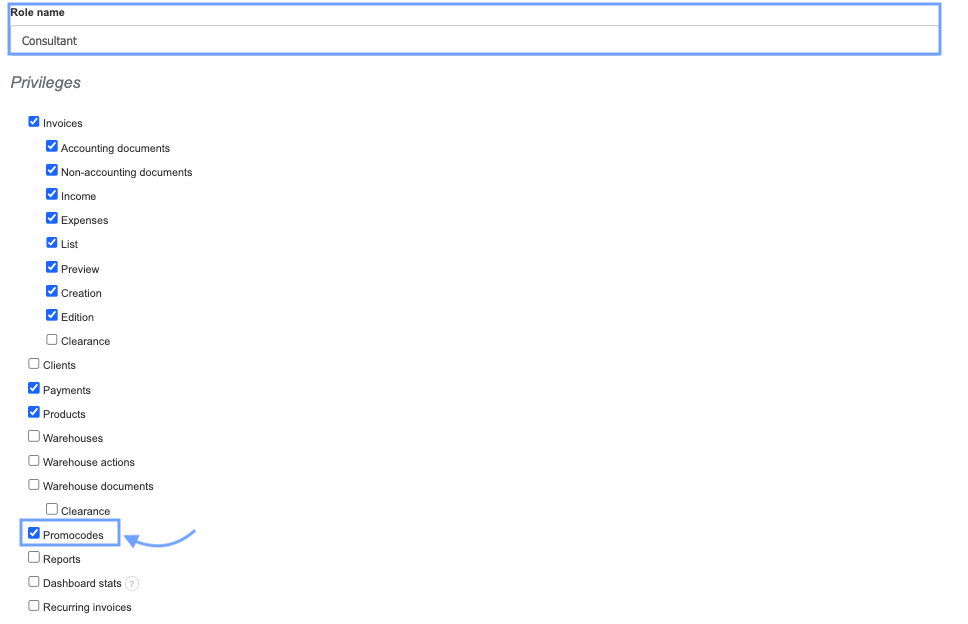
4. in the Privileges section, check the checkboxes for the options to which the user should have access,
5. to grant the ability to view, create, edit, and delete promotional codes, check the checkbox for the Promocodes option (to grant access to promotional codes, the user must also have access to the Payments tab),
6. Confirm the creation of the new role by clicking Save at the bottom of the page and assign the role to the selected email address.
A user with access to the Promotional Codes tab will be able to view existing promotional codes, create new ones, edit, and delete them. To ensure that the promotional codes functionality works properly, access to the Payments tab must also be granted.