1) If you want to merge two accounts (with separate logins) - named Y, under the main account - let's call it X, so that the owner of the account remains the owner of the main account X and you can easily switch from one account to another, follow these steps:
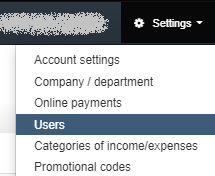
2) Log in to account Y, while logged in choose Settings> Users
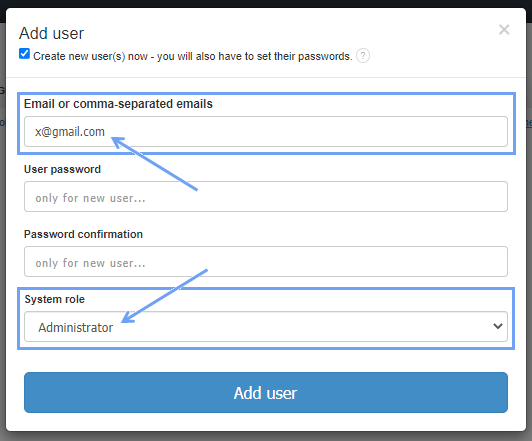
2) To add a new user, select the blue tab Add/invite user
3) In the next step, when the Add user window with the user's data pops up to fill in, enter the e-mail address with which the login to the main account X is performed, and set this user as the Administrator.
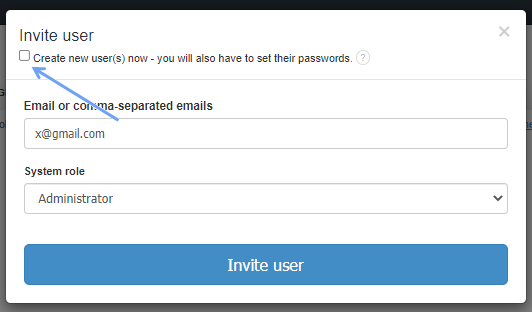
Alternatively, if the owner of the main account X wishes to confirm the addition, you can, by unchecking the Create new user(s) now – you will also have to set their passwords invite him as an Administrator as a user of account Y.
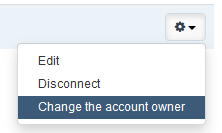
4) Once the main account X has become the user/administrator of the account Y, click settings next to the user X (the cogwheel on the right) and select Change the account owner and save the changes at the bottom of the page.

From now on, from the level of account X, you will be able to access account Y without any problem. On the black bar, next to the Search window, you have the user’s name. When you click on it, a list of other connected accounts will expand (in this case, the Y account).
