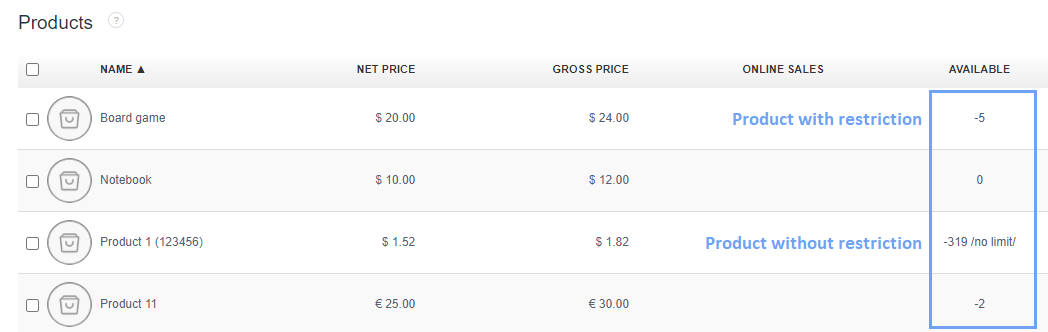
Our system provides for the possibility to enter a restriction on the product card when the product is out of stock.
The instruction how to activate the restriction on a given product can be found here.
However, to set such restriction, until now, you had to edit each product card separately.
For the needs of our clients, we have introduced a group handling of such restriction without the need to edit product cards.
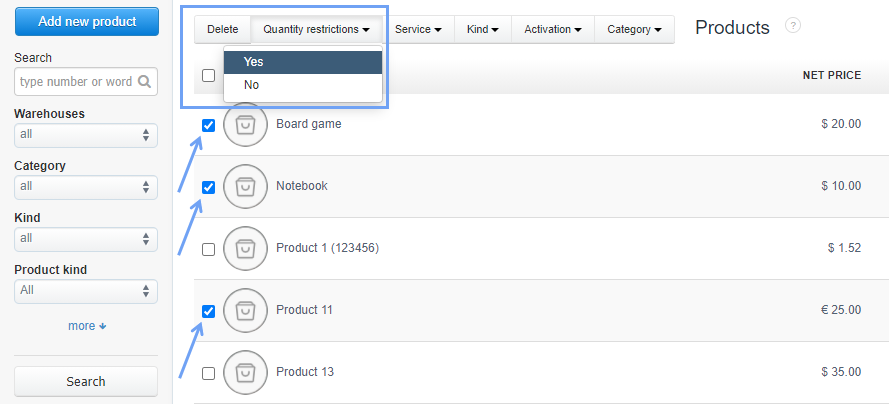
Simply access the product list via the Warehouse/Products> Products tab.
Then uncheck the boxes next to the products that do not have a restriction.
A Quantity restriction button will appear in the pop-up menu. After clicking on it, two options will appear: Yes and No.
In this case, once you limit the products in stock, how to know which products are limited and which are not?
It’s very simple. In the case of products limited in quantity, the exact quantity of the product will appear in the field AVAILABLE.
For unlimited products there will be a quantity/no limit/.