To remove column you should go to the Settings > Account settings, then ( at the left menu > print settings) and find field "Customize print with CSS" and paste code:
Example for remove the product code column:
}
@media all{
table.main_inv_table tr .code_col {
display:none;
}
}
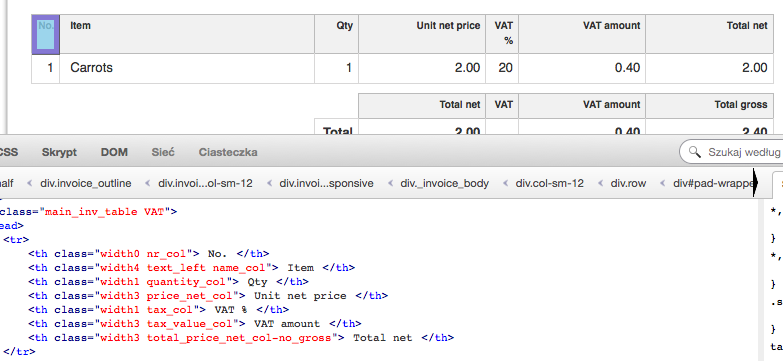
Below are codes of rest of the columns:
nr_col
text_left
quantity_col
price_net_col
tax_col
tax_value_col
total_price_net_col
... so ... to remove column just replace COLUMN-CODE with the right code.
}
@media all{
table.main_inv_table tr .COLUMN-CODE {
display:none;
}
}
Below are examples of column codes
Example for remove the product code column:
}
@media all{
table.main_inv_table tr .code_col {
display:none;
}
}
Below are codes of rest of the columns:
nr_col
text_left
quantity_col
price_net_col
tax_col
tax_value_col
total_price_net_col
... so ... to remove column just replace COLUMN-CODE with the right code.
}
@media all{
table.main_inv_table tr .COLUMN-CODE {
display:none;
}
}
Below are examples of column codes