Skip to content

Additional field on the invoice

Number of views: 2623 1 min read
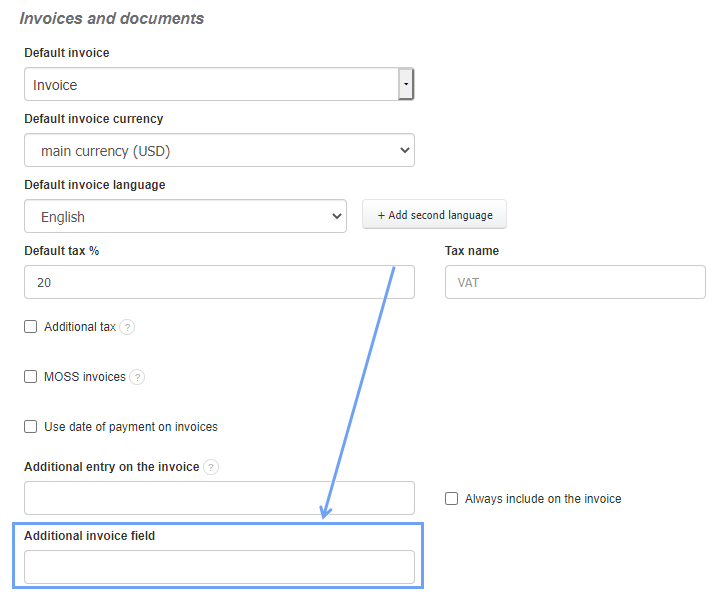
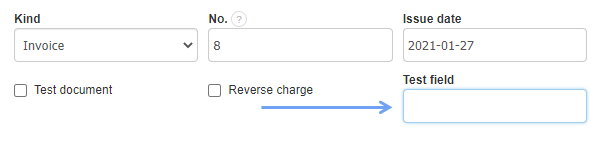
InvoiceOcean allows you to add an additional field on the invoice just below the data such as the issue date or the kind of the document, which can help in personalizing the invoice of each User. To enable this option:
  • go to Settings> Account settings> Configuration> Invoices and documents,
  • in section Additional invoice field select the option that is convenient for you or create your own formula that will be displayed in this place when creating or editing an invoice
  • press the Save button
 

Was this entry helpful?

Share

Main response Michał Borkowski 2023-06-07 14:28

Hello, 


the solution for you is to create your own invoice template, using HTML and CSS.

To do so, please go Account Settings > Invoice Template > Own invoice print template > Add new template.


Should you have more questions let me know. 

Comments (2)

Michał Borkowski 2023-06-07 14:28 Main response
Hello, 

the solution for you is to create your own invoice template, using HTML and CSS.
To do so, please go Account Settings > Invoice Template > Own invoice print template > Add new template.

Should you have more questions let me know. 
Anonymous 2023-06-05 12:37
Dear Sir/Ma'am I want to add 4 more additional invoice field and also want it to make ( Positions - name can't be blank ) Like no one can save the invoice without writing something in the field please help me to find the solution it's really important to our system I am using InvoiceOcean for the last two years I don't want to move to another website Please find the attached