Skip to content

How to enable expenses?

Number of views: 5520 1 min read

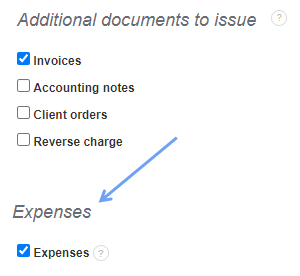
In the InvoiceOcean you can enter all invoices and expense documents (e.g. employment contract, contract for specific work, etc.). This allows you to have a complete picture of your company's financial condition. To activate expenses, go to Settings> Account settings> Expenses and select the Expenses checkbox and then save.

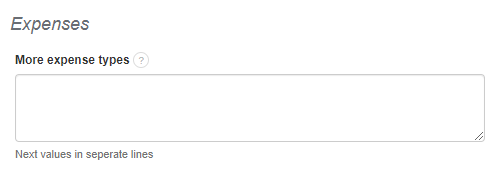
You can also define different types of expense documents. This function can be enabled in Settings> Account settings> Configuration> Expenses. Reports on your business can be obtained by going to the Reports section on your account.

Was this entry helpful?

Share

Main response Michał Borkowski 2021-04-29 17:06

Hello, 
I suggest you to consult such question with your accounting office and then get back to us with the answer. We will try to generate such document, so you could add said expenses to your account.
​​​​​​​Regards,

Comments (3)

Anonymous 2026-02-12 22:18
Hi there, I am also interested in having this feature available. As a self-employed electrician, I issue invoices to my clients and incur various business expenses, such as tool purchases, fuel, van costs, and other operational expenditures. It would be extremely useful to have the ability to record and manage receipts, as well as list purchased items and services, particularly for end-of-financial-year reconciliation and reporting purposes. Kind regards,
Michał Borkowski 2021-04-29 17:06 Main response
Hello,  I suggest you to consult such question with your accounting office and then get back to us with the answer. We will try to generate such document, so you could add said expenses to your account. ​​​​​​​Regards,
Anonymous 2021-04-26 07:19
how to add local expenses for Example: freight charges, transport charges like this