If you use barcodes in InvoiceOcean, you will be able to print labels from the system to mark the products you sell.
The system supports barcodes in the EAN-13 standard. To activate barcode display, go to Settings> Account settings> Configuration> Products and check the Use EAN code option.
The next step is to add products with barcodes to the system or supplement product cards with EAN codes. Codes can be added to products in two ways: manually entering a sequence of digits in the EAN Code field or by scanning the code with a scanner connected to your computer.
Printing labels

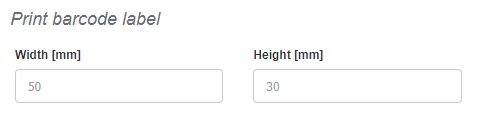
Before you start printing labels, you can adjust the size of the labels to suit your needs. To do this, go to Settings> Account settings> Print settings> Print barcode label. Please enter the size of your labels in millimeters. We suggest not printing labels smaller than 30x25mm. Smaller labels may not accommodate the entire barcode. The default size suggested by the system is: 50mm x 30mm
After adjusting the print settings, you can proceed to label generation:
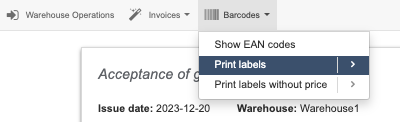
To print a label for a product, go to the product preview and select Barcodes in the top menu. System will display two printing options - Print label and Print label without price (only barcodes). Label can be printed this way also with inactive warehouse option.
Label printing can also be initiated from the warehouse document for a specific transaction. In this case, the system will generate a file containing the number of labels equal to the quantity of products on the warehouse document. For example, if there is one product on the document in a quantity of 7 pieces, the system will print 7 labels. To print labels in this way, go to the preview of the warehouse document, then click on Barcodes in the top menu, and select the print option.