Skip to content

How to change invoice status

Number of views: 5122 1 min read
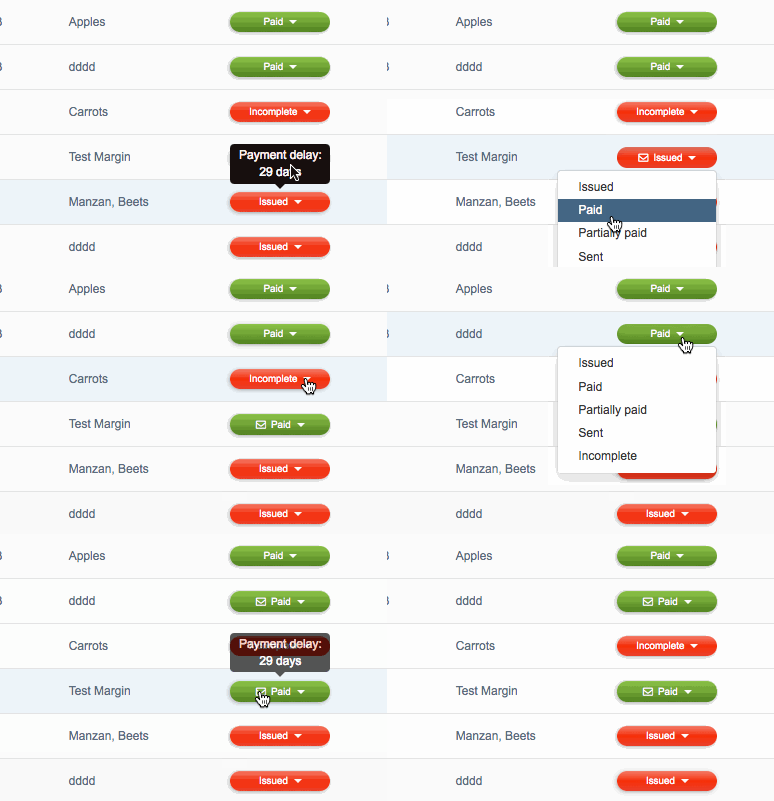
InvoiceOcean allows you to manually change the status of your invoices. This will allow you to keep track of your invoices in a convenient and clear way. Changing the status of an invoice can be done by navigating to Invoices, and in the status bar dragging down the status to the appropriate one. This can be done multiple times, for instance from Sent > Partially paid > Paid.
Was this entry helpful?

Share

Main response Michał Borkowski 2021-04-12 17:00

Hello,
users do not have option to add or to delete any of the document’s status in the system.
Kind regards,
Michal

Comments (2)

Michał Borkowski 2021-04-12 17:00 Main response
Hello, users do not have option to add or to delete any of the document's status in the system. Kind regards, Michal
Anonymous 2021-04-08 10:40
how to add incomplete status to invoiceocean