Within the account settings, you can also configure options related to the sending of documents from the system. You can use default sending settings or use your email address so that the sent message looks like it was sent from your own email inbox. In this article, you will learn where to enter the email address that will be displayed as the sender of the message.
Email address from which emails will be sent to customers
To set your own email address from which emails will be sent:
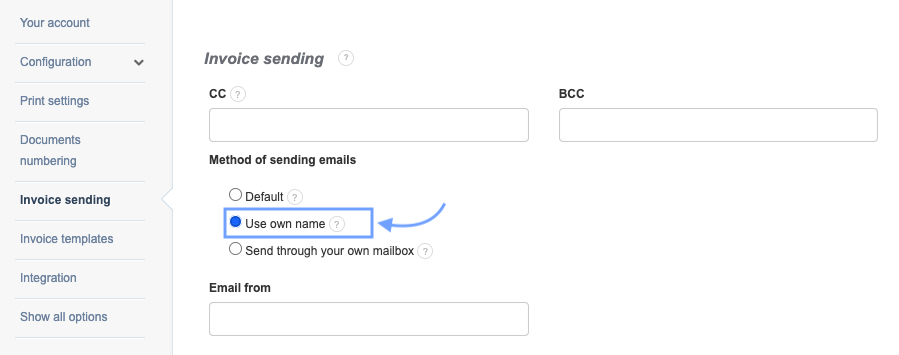
2. In the Method of sending emails section, check the box next to the Use own name option,
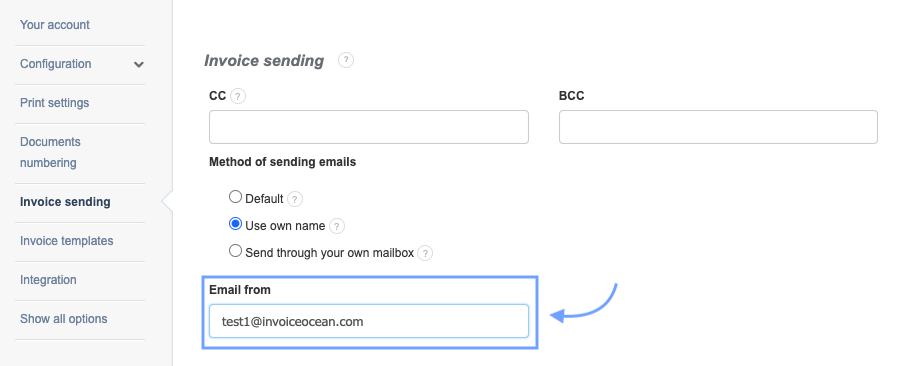
3. In the Email from field, enter your email address that you want to use,
4. Confirm the changes by clicking Save at the bottom of the page.
Messages will be sent through our server. However, as the sender of the message, instead of the default address noreply@invoiceocean.com, which appears in the default settings, the recipient will see your email address.
If you use the Use own name option, we suggest configuring the DNS settings in your own domain (from which the messages will be sent). Details regarding DNS configuration can be found in the dedicated article → DNS and DKIM Settings for Sending Emails through your own mailbox.