InvoiceOcean provides users with the ability to check their activity, meaning the actions they performed on the account and when they were executed.
However, access to Activity is limited to the system User with the role of account owner—most often the person who registered.
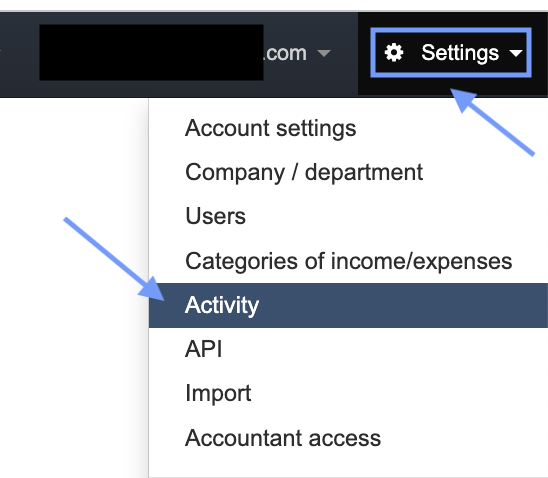
You can find information about your activity by going to Settings > Activity menu.
Users have access to a list of activities related to invoice sending, which include:
- Sending an invoice,
- Sending an invoice after auto-payment,
- Sending a reminder for an unpaid invoice,
- Sending an automatic reminder for an unpaid invoice,
- Sending a recurring invoice,
- Creating a recurring invoice.
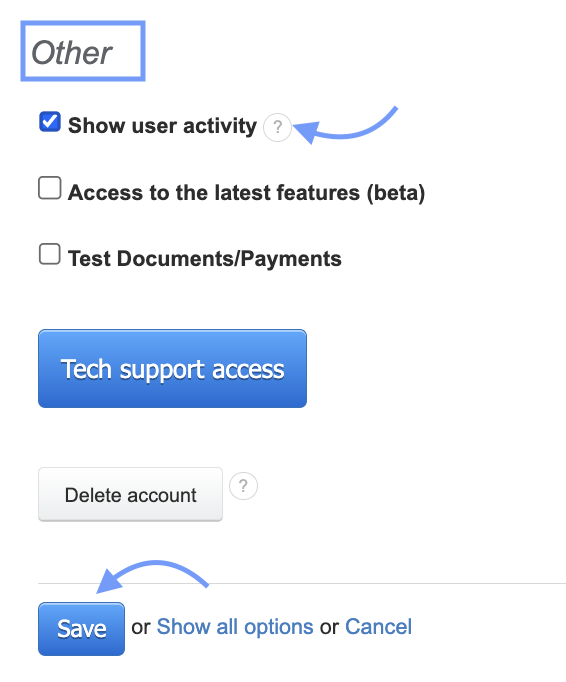
By going to the Activity tab (visible in the Settings menu after activating the Show user activity function in the Settings > Account settings > Other menu), you will learn everything about issued documents, the time of their editing, printing, and whether the sent document was delivered to the Client.
In addition to the activities mentioned above, the following will also be visible:
- Auto-payment sent (custom template)
- Data backup
- Document editing
- Department editing
- Account editing
- Operator note editing
- Warehouse operation editing
- Editing the account change history entry
- Information about vendor change
- Reset of failed logins
- Token reset
- Document deletion
- Department deletion
- Account deletion
- Warehouse operation deletion
- Creating a department
- Creating an automatic payment
- Creating a document
- Creating a new entry in the account change history
- Printing a document
- Generating a password reset link
- Sending a link to generate a Proforma
- Inviting a User
- Changing the account plan during the trial period—selecting a higher one
- Changing status.
You can access activities from any issued document in the system. On the bottom of the document, in the invoice preview, we have a section for document activity, where the sentence All activities is highlighted in blue. By clicking on it, the program will take us to the aforementioned activities.
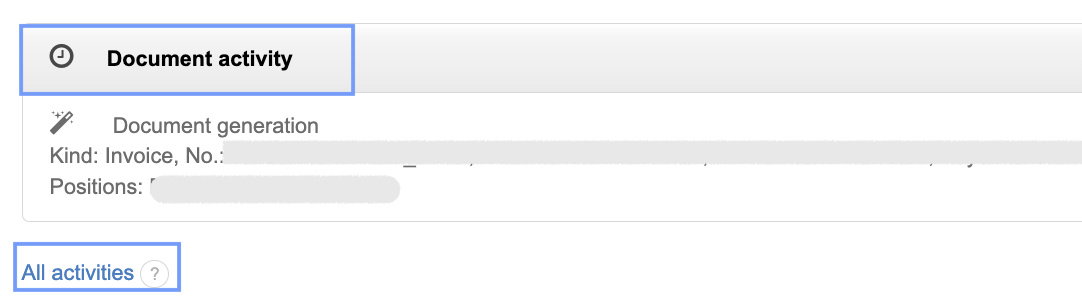
Only a User with the account owner status can use the All activities option.