In InvoiceOcean, there is the possibility to restrict the visibility of a product to specific users of the system and make it accessible to only one of them or a selected group. Other departments or companies, as well as users assigned to them, will not see the chosen products in the system.
To do this:
- Create a new department following the instructions provided in the post New Department, New Company, New Bank Account – Differences and How to Add Them.
- Assign the department to a user according to the instructions given in the post How to add new users and give them access to a specific department.
- Go to the Settings > Account Settings.
- Navigate to the Configuration > Users and Privileges tab.
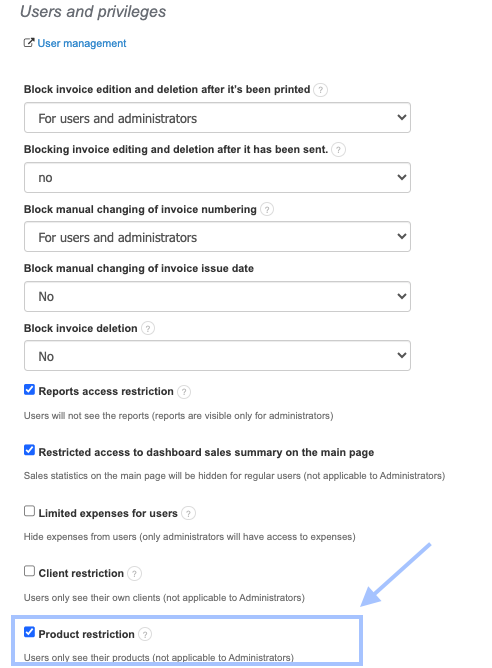
- Check the box for Product restriction
Press the Save button;
Go to Warehouse > Products in the top menu bar;
Using the gear icon, click the Edit button next to the selected product;
Press the See more options button;
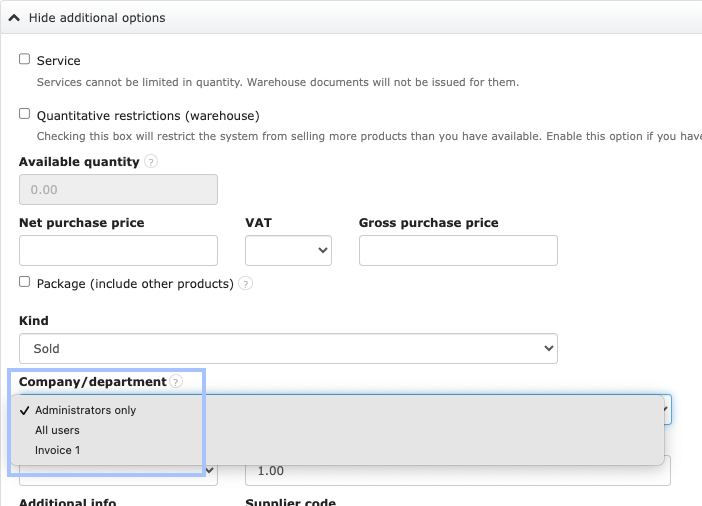
From the Company/department (data access) section, choose the department (and therefore users) that should have access to the visibility of the selected product;
Press the Save button
To similarly limit the visibility of warehouses or customers, follow the instructions described in the post Limiting Warehouse Visibility or How to Limit Customer Visibility.