Often, it is necessary to correct non-numeric data that influences the transaction amount, such as incorrect customer details like address or tax identification number (VAT). Sometimes, corrections are needed for the location or name of the product sold.
As a buyer, you can use a Correction note to correct such data on an invoice.
What should you do when you need to make corrections from the seller's perspective?
The seller is obligated to issue a Credit Note. In our system, we have introduced additional fields that allow entering corrected non-numeric content that does not affect the transaction amount.
To issue a Credit notes, you first need to activate this type of document in the system. To do this, go to Settings > Account Settings. In the Additional documents to issue section, check the Credit Notes box. Confirm the changes by clicking the Save button at the bottom of the page.
From that moment, you can issue this type of document in the system.
Go to the Income tab > Invoices. Select the invoice that needs correction and by clicking on its number, access the preview of the document. From the visible invoice, select More options > Issue Credit Note.

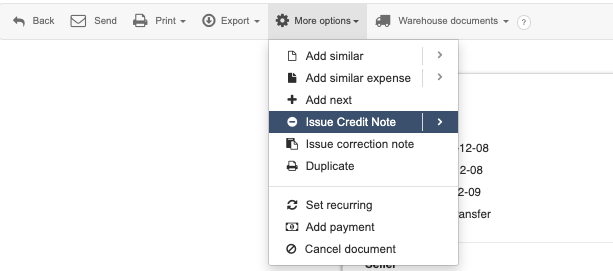
In this case, the buyer's data on the invoice will be corrected, specifically the street and number. The elements on the invoice remain unchanged.
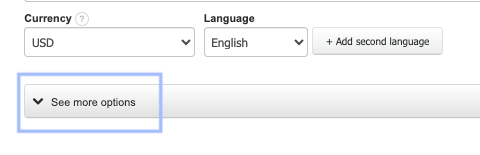
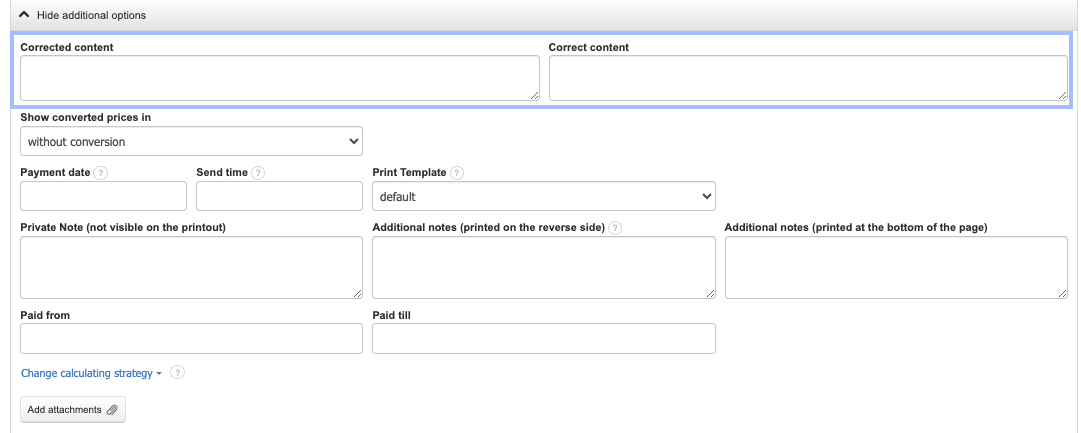
In the Credit Note form, you will find additional fields: corrected content and correct content. They are visible when expanding the See more options section or hiding additional options if this section is already expanded.
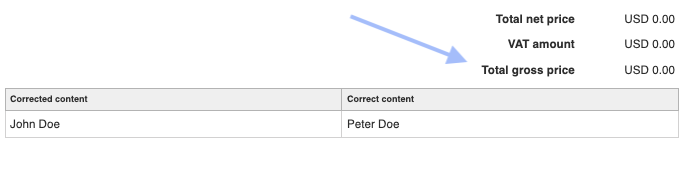
After saving such correction, the numerical data in the invoice positions and the summary will not change (the correction amount will be zero). This correction value is intended to indicate that the transaction amount has not changed.
Questions about correcting data on the invoice
- What happens if the buyer's country was entered incorrectly?
If the incorrectly entered country refers to the buyer's data fields, then those details should be corrected by the buyer using a Correction Note.
Also, check: How to create a Credit Note?