Using InvoiceOcean, you have the ability to influence the numbering format of your documents.
Below, you can see example numbering formats:
- 1/01/2011, 2/02/2011, etc.
- 1/2011, 2/2011, etc.
- 1, 2, etc.
- INV/1, INV/2, etc.
- 2011/1, 2011/2, etc.
- 2011/01/1, 2011/02/1, etc.
- INV2011/01/1, INV2011/02/1, etc.
- 11/1/17/1, 11/1/17/2, etc.
To choose one of the provided numbering formats or create your own, go to the Settings > Account Settings, and then to the Documents numbering tab. Make your selections in the relevant fields and click the Save button.
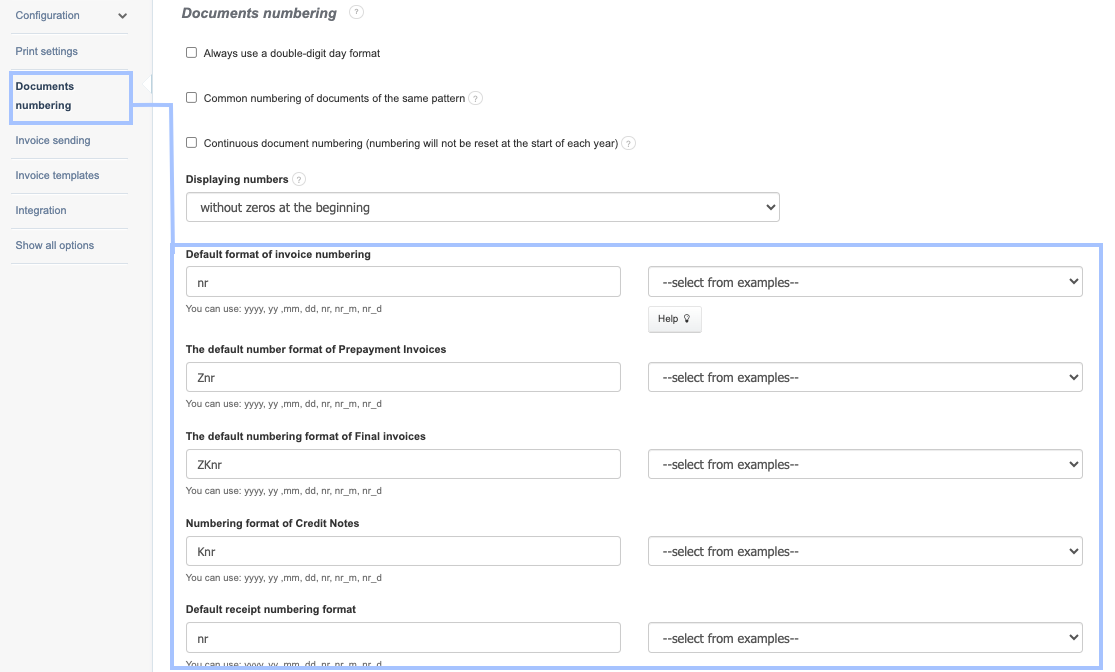
Custom Numbering
You can create your own numbering format by adding custom elements found in the number and using the variables below:
nr - consecutive number counted from the beginning of the year, e.g., 1, 2, etc.
nr-m - consecutive number counted from the beginning of the month
nr-d - consecutive number counted within a specific day
yyyy - four-digit year, e.g., 2011
yy - two-digit year, e.g., 11
mm - month, e.g., 01
dd - day
Example of a custom numbering format:
nr-m/m/D2 - This format includes the consecutive number counted from the beginning of each month, the month in which the document is issued, and a user-defined, constant identifier "D2". In this case, the invoice numbering will look like:
1/01/D2, 2/01/D2, 3/01/D2, 1/02/D2, 2/02/D2, etc.